ALT Codes for Windows

ALT Codes for windows. Here you will find the list of ALT key codes for special characters and symbols. Also, learn how to use it.

☺1@64⌂127
☻2A65Ç128
♥3B66ü129
♦4C67é130
♣5D68â131
♠6E69ä132
•7F70à133
◘8G71å134
○9H72ç135
◙10I73ê136
♂11J74ë137
♀12K75è138
♪13L76ï139
♫14M77î140
☼15N78ì141
►16O79Ä142
◄17P80Å143
↕18Q81É144
‼19R82æ145
20S83Æ146
╛190²253Â0194
┐191■254Ã0195
└192spc255Ä0196
┴193€0128Å0197
┬194‚0130Æ0198
├195ƒ0131Ç0199
─196„0132È0200
┼197…0133É0201
╞198†0134Ê0202
╟199‡0135Ë0203
╚200ˆ0136Ì0204
╔201‰0137Í0205
╩202Š0138Î0206
╦203‹0139Ï0207
╠204Œ0140Ð0208
═205Ž0142Ñ0209
╬206‘0145Ò0210
╧207’0146Ó0211
╨208“0147Ô0212
╤209”0148Õ0213
§21T84ô147
▬22U85ö148
↨23V86ò149
↑24W87û150
↓25X88ù151
→26Y89ÿ152
←27Z90Ö153
∟28[91Ü154
↔29\92¢155
▲30]93£156
▼31^94¥157
spc32_95₧158
!33`96ƒ159
"34a97á160
#35b98í161
$36c99ó162
%37d100ú163
&38e101ñ164
'39f102Ñ165
(40g103ª166
╥210•0149Ö0214
╙211–0150×0215
╘212—0151Ø0216
╒213˜0152Ù0217
╓214™0153Ú0218
╫215š0154Û0219
╪216›0155Ü0220
┘217œ0156Ý0221
┌218ž0158Þ0222
█219Ÿ0159ß0223
▄220spc0160à0224
▌221¡0161á0225
▐222¢0162â0226
▀223£0163ã0227
α224¤0164ä0228
ß225¥0165å0229
Γ226¦0166æ0230
π227§0167ç0231
Σ228¨0168è0232
σ229©0169é0233
)41h104º167
*42i105¿168
+43j106⌐169
,44k107¬170
-45l108½171
.46m109¼172
/47n110¡173
048o111«174
149p112»175
250q113░176
351r114▒177
452s115▓178
553t116│179
654u117┤180
755v118╡181
856w119╢182
957x120╖183
:58y121╕184
;59z122╣185
<60{123║186
µ230ª0170ê0234
τ231«0171ë0235
Φ232¬0172ì0236
Θ233®0174í0237
Ω234¯0175î0238
δ235°0176ï0239
∞236±0177ð0240
φ237²0178ñ0241
ε238³0179ò0242
∩239´0180ó0243
≡240µ0181ô0244
±2410182õ0245
≥242·0183ö0246
≤243¸0184÷0247
⌠244¹0185ø0248
⌡245º0186ù0249
÷246»0187ú0250
≈247¼0188û0251
°248½0189ü0252
∙249¾0190ý0253
=61|124╗187
>62}125╝188
?63~126189
·250¿0191þ0254
√251À0192ÿ0255
ⁿ252Á0193
Copied!

About ALT Codes

Have you ever wondered how we can type some of the special characters like alpha symbol, copyright sign, bullets, square root, and many more when they can't be directly typed from the keyboard?

Look at your keyboard, you have alphabets, numbers, some common symbols, and rest function keys. These all can easily fulfill your normal day to day life writing needs. But some professional writing requires even more special characters.

Inheriting them from symbol tools or copying them from any resource is not an efficient solution. Hence, the best practice is to use the ALT Key Codes.

What are ALT Codes?

In a Windows computer, holding the ALT button on the keyboard activates a list of special characters known as ALT Codes. Each ALT Code has its respective number. It should be typed from the numeric keypad while holding the ALT key in order to type that character. Also, we have explained the step by step process in the next section.

This whole concept was at first developed by IBM and worked on Microsoft Windows computers. The interpretation takes place in the BIOS. BIOS is a process that interprets the user's action and prints the corresponding symbol at the cursor's location. After that Microsoft developed their new set of codes along with the previous one. The code which starts from "0" represents the new set of codes. It's called ANSI Codes which were later changed to Windows ALT Codes. However, the latest systems use Unicode because the ANSI had some compatibility issues. After eliminating all these problems, the latest Windows machines are using the Unicode system.

How to print ALT symbol using keyboard?

Prerequisites:

  • Firstly, turn On the NumLock or Numpad if it's Off.
  • Make sure that the ALT key is working perfectly.
  • It works only on Windows system.

Now follow the steps below.

  1. Press and hold the ALT key.
  2. Type the ALT Code on the numeric keypad.
  3. Release the ALT key.
  4. That's it. The code will be printed on your screen.

Let's try it by example to make it clear.

The ALT code for the infinity sign(∞) is 236. So, firstly, we have to press and hold the ALT key then type 236 using the numeric keypad. Lastly, release the ALT key and you'll get the infinity sign(∞) on your notepad screen.

For Offline Use
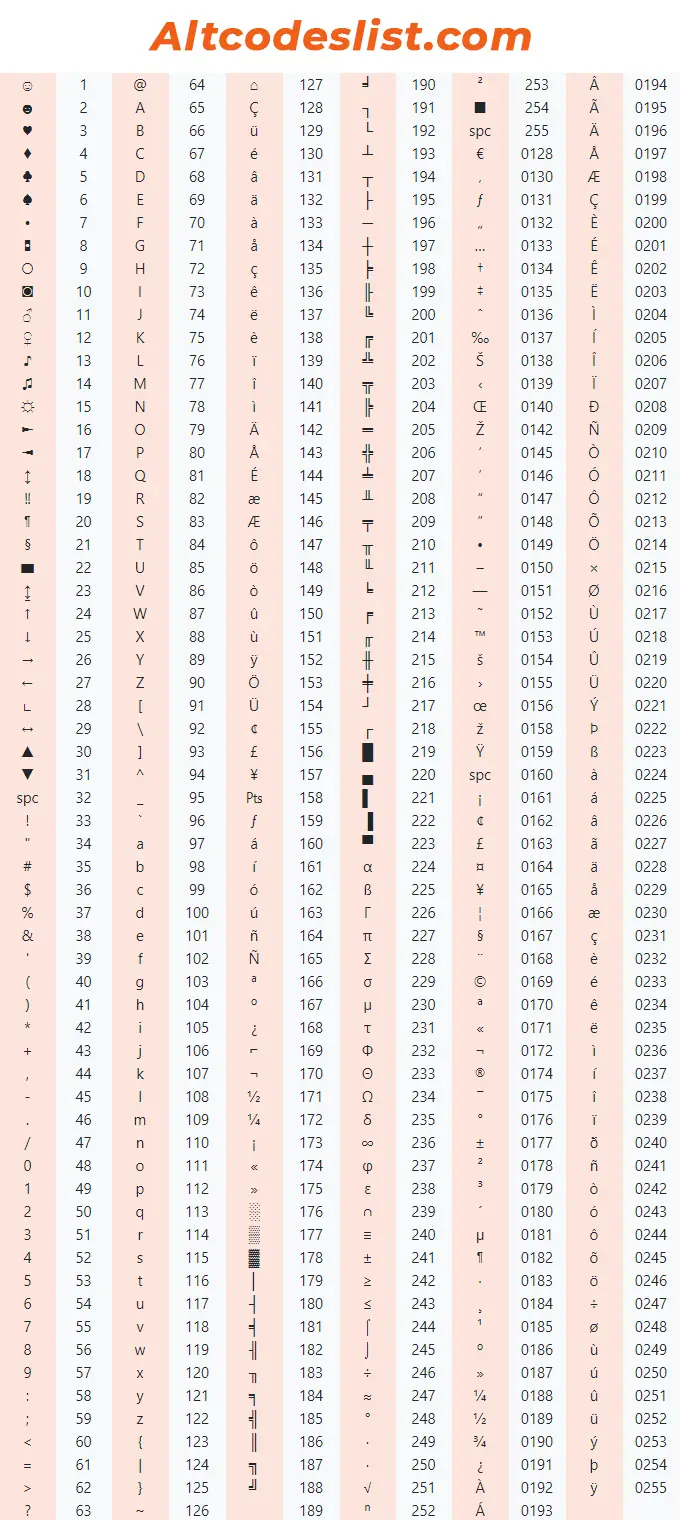
ALT Codes | Windows ALT Key Codes for Characters & Symbols

Final Words

Above all information was all about ALT codes and how to use them. Using these codes bridges the gap between digital writing and real-world writing. You can now easily use all kinds of symbols to enhance your writing. It's also a time-saving process. Now, you can type your research papers or academic papers with even more comfort.